Commission Calculator
Commission Calculator
Commission Calculator Easy Guide & How to Use It (Step-by-Step)
Commission Calculator is a simple online tool designed to help you quickly calculate the commission amount you earn from sales whether you’re a salesperson, freelancer, agent, or business owner. This calculator removes manual math and gives immediate, accurate results based on your inputs.
Whether you want to estimate your earnings or figure out how much commission you should pay, this tool handles it in just a few clicks.
What Is a Commission Calculator?
A Commission Calculator is a financial tool that calculates how much commission you (or someone) will earn on a sale based on the total sales amount and the commission percentage.
A commission, in simple terms, is a percentage of sales revenue earned by a salesperson or agent for closing deals.
Sales commissions play a major role in motivating sales teams and rewarding performance and this tool helps you compute that earning instantly.
Why Use a Commission Calculator?
Using a Commission Calculator has several benefits:
Saves time compared to manual calculations
Reduces mathematical errors
Helps salespeople track earnings quickly
Assists business owners planning compensation
Useful for freelancers and agents who earn by commission
Perfect for planning finances and growth
Step-by-Step: How to Use the Commission Calculator
Follow these easy steps to get your commission amount instantly:
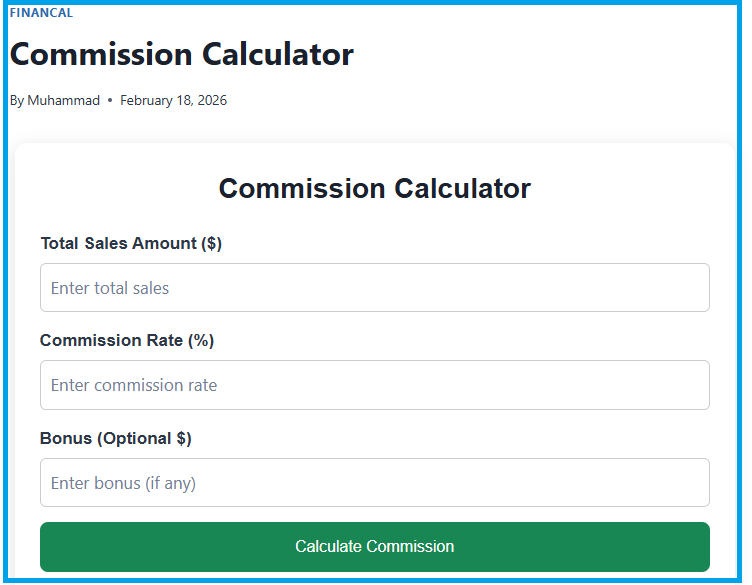
1. Enter Total Sales Amount
Type in the total value of items or services sold.
This is the base figure the commission will be calculated on.
Example: If you sold products worth $5,000 in total, enter 5000 in this field.
2. Enter Commission Percentage
Enter the percentage you earn as commission for example, 10 for 10%.
This rate is the agreed commission rate you earn per sale.
Example: If your commission is 8%, enter 8 in this field.
3. Click “Calculate”
Hit the Calculate button.
The calculator automatically performs the math and shows the total commission earned.
The basic formula used is:
Commission Amount = Total Sales × Commission Percentage ÷ 100
This formula multiplies your sales by the commission rate to give your earnings.
Example Calculation
Imagine you made $10,000 in sales, and your commission rate is 7%:
Total Sales = $10,000
Commission Rate = 7%
Calculation:
$10,000 × 7% = $700
So you would earn $700 in commission.
(commission calculated automatically once you enter the values)
Quick Tips for Using the Calculator
No math skills needed: Just input values and click Calculate.
Use decimal figures: If your commission rate has decimals (like 7.5%), the calculator still works.
Try different scenarios: Enter different sales amounts to forecast potential earnings.
Ideal for planning: Great for monthly or quarterly commission projections.
Who Should Use This Commission Calculator?
This tool helps a variety of users:
Sales professionals calculating monthly or annual income
Business owners planning commission structures
Freelancers or agents paid by commission
Managers comparing different commission rates
Finance teams building payout reports
Common Commission Calculation Mistakes to Avoid
Using the wrong commission percentage
Forgetting to divide by 100 in manual calculations
Leaving fields blank before pressing Calculate
Confusing net profit and gross sales
Using this online calculator eliminates all these errors.
Conclusion:
Commission Calculator at MeasureCalculators is a fast, accurate, and user-friendly tool that simplifies how you compute commission payments. Just enter your sales and commission rate, and let the calculator instantly give your commission perfect for businesses, sales professionals, agents, and freelancers alike.